Sales order
Quantity, price and delivery date are entered; demand flows to planning.
SAL · CMP · TRG

Integrated enterprise process management from manufacturing to finance.
CANIAS ERP is an enterprise ERP platform with deep manufacturing, logistics and finance coverage, shipping with its own database (iasDB) and its own object-oriented development environment (TROIA). Its distinguishing feature is that processes the standard does not cover can be solved inside the product’s own development environment while preserving the integrity of the standard source.
When the order changes, planning, stock and cost move together. Hover a step to see which CANIAS modules run.
Quantity, price and delivery date are entered; demand flows to planning.
SAL · CMP · TRGMaterial needs and lead times are calculated from BOM, stock and open orders.
MRP · DMF · BOMRequests and orders for missing material; import process for foreign purchases.
PUR · IMPGoods receipt, lot and bin; the purchase invoice is verified.
INV · WMS · VERThe production order opens against routing and capacity and is loaded to work centres.
PRD · ROU · CAPActual consumption and time from the floor; production intelligence and automation.
PRD · PRI · AUTInspection plans, checks and non-conformance records.
QLTFinished goods enter stock; actual production cost is calculated.
INV · PRC · INCPacking, shipping and export documents.
PAC · SHM · EXPSales invoice; e-invoice, e-archive and e-waybill.
SAL · EIN · EAM · EDNLedger entry, standard vs actual cost variance and financial reporting.
FIN · CAL · COS · FRMThe headings in the vendor’s official module list, with their own group codes. Not all of them are deployed on a project; scope is set by fit-gap.
Master data, BOM, routing, production orders, costing and automation in one model.
Module group details →Demand forecasting, MRP and capacity with budget, scorecard and risk.
Module group details →Stock, warehouse, transfers, purchasing, invoice verification, import and shipping on one document chain.
Module group details →Sales, export, campaigns, commissions and targets; customer relations, opportunities, requests and surveys.
Module group details →General ledger, finance, consolidation, fixed assets, costing and e-transformation.
Module group details →Quality, service and maintenance on the same records as production and logistics.
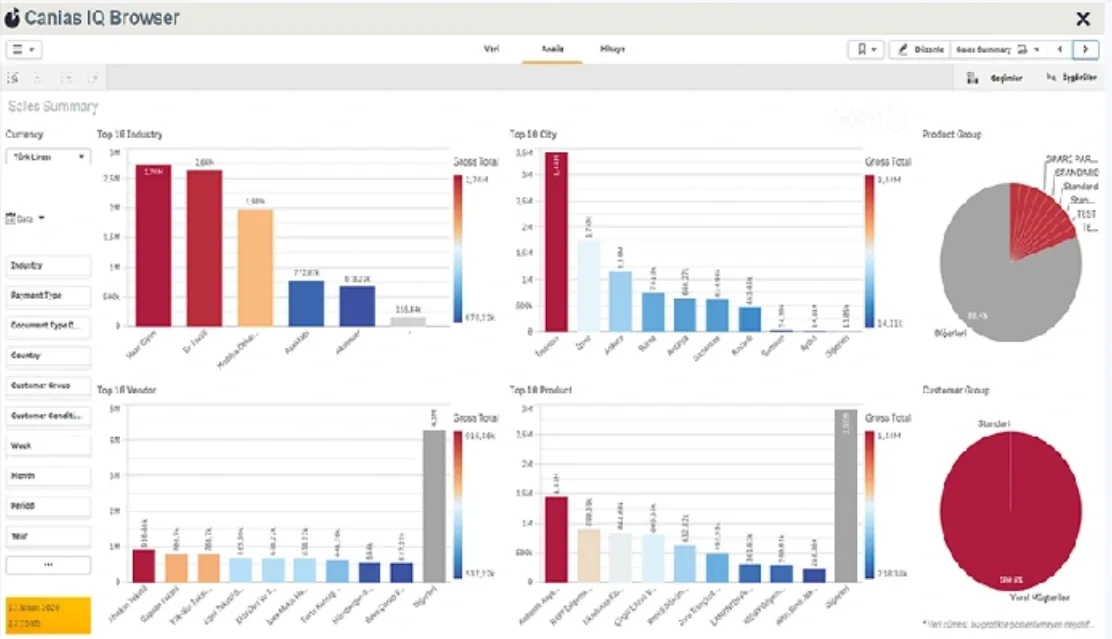
Module group details →caniasIQ: sales summary by industry, city, vendor and product; operational data becomes management indicators.
Module group details →TROIA development tools, workflows, web services, EDI, documents and system management.
Module group details →The module names and codes in this section are taken from the vendor’s official module list. Licence scope, version policy and product roadmap are the vendor’s responsibility; we recommend verifying current scope in the vendor’s documentation.
01 OBJECT: SALES ORDER · BEFORE SAVE
02   CHECK CREDIT LIMIT
03   IF LIMIT IS EXCEEDED
04     START APPROVAL FLOW (REGION → FINANCE)
05     HOLD THE RECORD
06   ELSE
07     VALIDATE DELIVERY DATE WITH MRP
08 COMPLETE RECORD · WRITE AUDIT TRAILTROIA is CANIAS’s own object-oriented development environment, with its own IDE, compiler and interpreter. The code we write lives inside the application; we do not build a side system that bypasses the ERP.
Screens and forms in the ERP’s own interface layer for processes with no standard equivalent.
Consistency, limit and mandatory-field rules that run when a record is opened and saved.
Multi-level approval and hold mechanisms tied to amount, line item or risk threshold.
Breakdowns the standard report does not cover; outputs exposed to a data warehouse or BI layer.
Secure, traceable connection of external systems to the ERP and the definition of service contracts.
Scheduled jobs, bulk record generation, data correction and file-driven processing flows.
An inventory of developments accumulated over the years: which are still in use, which are dead code?
Slow screens, reports and batch jobs addressed at the query and data-access layer.
Assessing before an upgrade whether each customisation conflicts with changed standard behaviour.
In CANIAS a customisation can be written without modifying the standard object directly: a customer-owned class takes the place of the standard class. The discipline is this — when standard behaviour needs to change, it is handled in the customer layer rather than by editing the standard source. There is a price for this and we say it upfront: every customisation is customisation debt, and that debt is paid at upgrade time. So we do not turn every request into development; where the standard offers an acceptable route, we recommend that first.
Before an upgrade we establish which developments are still used and which are dead code. Customisations that will not be carried forward make the upgrade cheaper.
Code in the customer layer is not deleted outright by an upgrade, but it can conflict with changed standard behaviour. Every item is assessed individually.
Which flows enter regression testing after an upgrade is derived from the customisation inventory.
Slow screens and reports are addressed through data access, indexing and batch design; adding hardware is not the first answer.
Let’s establish your current version, the modules genuinely in use and the customisations that have accumulated — then decide on upgrade or improvement.
Version, the modules genuinely in use and the existing customisation inventory.
Listing separately where processes fit the standard and where they do not.
Deployment, master data design, opening balances and authorisation.
Screens, reports, business rules, approval flows and automation.
Connections to banking, e-documents, POS, e-commerce, B2B, WMS and production systems.
Separate migration and verification plans for master data, open transactions and history.
Customisation inventory, conflict assessment and regression test coverage.
Regular support, performance monitoring and keeping the customisation inventory current.
Our work runs on your installation: we solve the processes the standard does not cover using the platform's own methods, and we do it without breaking version upgrades. Licensing, release policy and the product roadmap remain the vendor's responsibility.
The module map and the TROIA development scope are set out above. For the layer architecture, database structure and comparative evaluation criteria, see what is CANIAS ERP.
We map your processes onto what the standard covers and list what it does not in a fit-gap register. Module go-live, master data design, opening balances and data migration are planned from that register. Which process is solved by configuration and which by development is stated separately in the scope document.
TROIA is CANIAS's own development platform, with its own IDE, compiler and interpreter. We write screen, report, workflow and process customisations on that platform. The code lives inside the application; we do not stand up a side system that bypasses the ERP.
We build the links to banks, e-invoicing, POS, e-commerce, B2B, WMS, production systems and third-party services. Our baseline is that a retried request must not create a duplicate record and that every flow must be observable; the detail is on the API and system integration page.
Upgrading an existing installation, reviewing accumulated customisations and ongoing support. Before an upgrade we establish which customisations are still in use and which are dead code; a customisation that does not have to be carried forward makes the upgrade cheaper.
CANIAS provides a structure that lets a customisation be written without editing the standard object directly: a customer-owned class takes the place of the standard class. The discipline is this — when standard behaviour must change, it is handled in the customer layer rather than by editing the standard source.
There is a price, and we say it up front: every customisation is customisation debt. The upgrade is where that debt is settled. So we do not turn every request into development; if the standard offers an acceptable route, we propose that first.
We publish no unmeasured success rate, average project duration or customer count. CANIAS module coverage and licence rights depend on your own contract; nothing on this page replaces the vendor's licence terms. We recommend verifying the product's current capabilities in the vendor's own documentation.
No. We hold no formal partnership on the CANIAS side; we provide independent consulting. Your counterpart for licensing and product support is the vendor.
Yes; a substantial part of our work is on installations that are already live. We start by taking an inventory of the existing customisations.
The code we write stays in your installation and its source is yours. The scope document records the rationale for each customisation and the standard object it affects; if you continue with another team, the handover runs through that document.
If a customisation was written in the customer layer, an upgrade does not delete it outright — but it can conflict with changed standard behaviour. That is why a customisation inventory is produced before the upgrade and each item is assessed individually.
Let’s establish your current version, the modules genuinely in use and the customisations that have accumulated — then decide on upgrade or improvement.
Technical discovery call
Leave your details and pick a day that suits you; we will come back to confirm. On the call we listen to your current system, the bottleneck and your goal. There is no charge for the first call.
Your request has been received.